How to create CI/CD process based on your favorite repository?
The continuous integration and continuous delivery is an integral part of the development cycle. This article is about how to get the CI/CD process up and running with effective and popular CI/CD tools.

Product development that complies with agile methodologies makes CI/CD (continuous integration / continuous delivery or deployment) a necessary part of the software development cycle. As it ensures gradual delivery of the product to the client in small batches, this way increasing bug-resistance. You can set up CI/CD on all popular repositories: GitLab, GitHub, AWS CodeCommit, Bitbucket, without using third-party services.
We are strong supporters of CI/CD and use it on almost every project, as it is a proven technology that prevents manual build distribution and reduces time on finding bugs that weren’t detected during the development stage. CI/CD makes emphasis on automation, meaning that every newly pushed commit gets through this flow and cannot omit it. So, if you are standing against redundant manual testing, then CI/CD is the right option.
CI/CD is applied for the three most common product development stages: test, build (if necessary), and deploy, the final stage after the successful passing of the previous ones. After we trigger a new git commit in our repository, with CI/CD implementation we can thoroughly analyze and test this code, using the docker container environment under the hood. That’s how we deploy fully revised, working, and high-quality code in the end-result.
To enable this seamless process in our team, we make use of such services as GitLab (Pipeline), GitHub (Actions), and AWS (CodePipeline). In this article, we are going to examine them in detail, discussing their main peculiarities.
GitLab CI/CD (Pipeline)
GitLab CI/CD (Pipeline) follows code commits in the GitLab repository and executes the steps (jobs) described in the .gitlab-ci.yml file, where we choose the environment (image) for these processes to run:
image: node:12.10.0For the launch of the docker container and jobs execution we use GitLab Runners, which fall under the following types:
- Shared Runners: public machines for shared use.
Pros:
- free to use for public open-source projects;
- no need to configure;
Cons:
limited to 2000 CI minutes per month per group for private projects;
the speed depends on the number of users.
- Specific Runners: private machines, which are targeted to process only your code commits. They can be launched in two ways:
- installed on a Kubernetes cluster.
Pros: operate in the cloud; Cons: fee-based, and you’ll need to use third-party services: create a cluster in Google Cloud Platform (GCP) or Amazon Elastic Kubernetes Service (EKS) using GitLab’s UI OR Add integration to an existing cluster from any Kubernetes platform.
- set up manually, which means running the local environment on your laptop/computer. Our team opts for this variant, as it is free, flexible, and private.
Runner unwraps the container with the operation system, where all the stages described in the .gitlab-ci.yml file take place:
stages:

- test
- deploy
Here we also can set up how to react to the new commits in the specific branch and what stages we need to activate in this case:
only:

- master

stage: deploy
If any of the stages does not go well, the next one won’t be launched, as it is clear from this example:

In GitLab all the sensitive data is protected by adding to the CI/CD Environment variables, this allows us to avoid including this data in the project code:

The stage of deployment lies in the transportation of the new code variant into AWS EC2 machine and the update of the docker containers based on this new code variant, and as a consequence update of our product as well.
GitHub CI/CD (Actions)
It is similar to GitLab CI/CD (Pipeline) but is used for managing commits in the GitHub repository. The whole CI/CD flow is described in the file github-ci.yaml, where we also choose the environment (runs-on) and necessary parts (strategy) for the launch of our project in that environment:
runs-on: ubuntu-latest

strategy:

matrix:

node-version: [12.x]

mongodb-version: [4.4]
GitHub (Actions) provide a clean instance for every job execution if you use GitHub-hosted runners.
We’re also able to choose branches in the github-ci.yaml file:
push:

branches:

- main
Identify stages in it, which are called “jobs”:
jobs:

test:
The whole flow is almost the same as GitLab CI/CD, but the jobs are handled by:
- GitHub-hosted Runners (or public).
Pros:
- simpler and quicker way to run a flow;
- receive automatic updates for the operating system;
Cons:
- have a minutes limit, and GitHub takes a per-minute fee after all the free ones are used up.
- Self-hosted Runners (or private).
Pros:
- can use cloud services you already pay for;
- free to use with GitHub Actions;
- customizable to your hardware, operating system, software, and security requirements.
Cons:
- need to be set up manually;
- you have to pay for the maintenance of your runner machines.
An example of the successful job result, using GitHub-hosted runner:

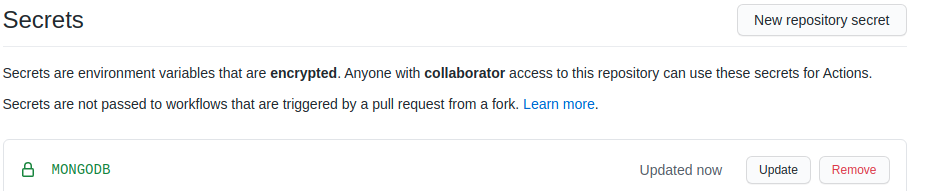
In GitHub, our private data is secured in the Secrets of the repository:
AWS CI/CD (CodePipeline)
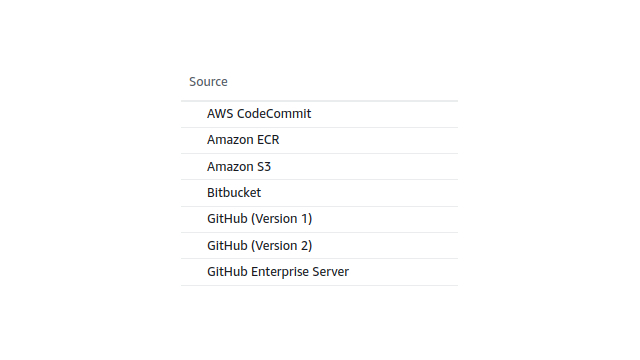
It makes sense only if you use other AWS products as well. The following services can be chosen as the source of the new code income trigger:
After the new version of the code appears on the chosen CodePipeline service, you can set up a flexible sequence of the processes, including test, deployment, etc. AWS CodeBuild here performs the role of the Runner for the launch of Unit Tests. The process gets clear from the example below:
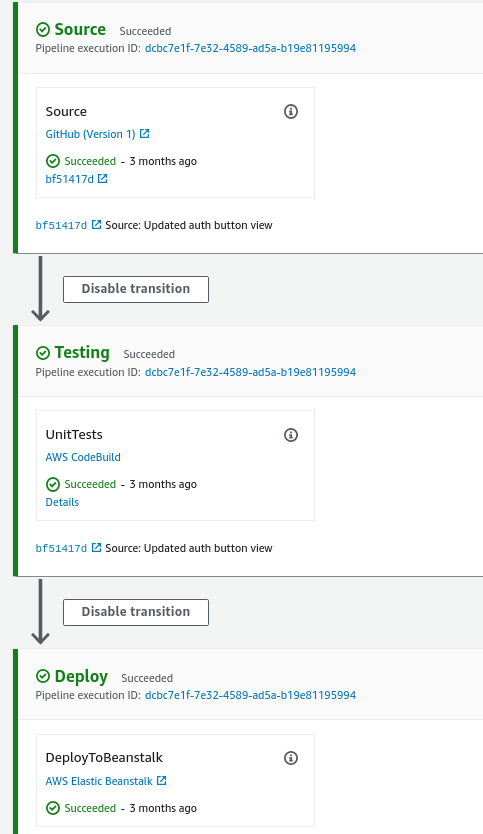
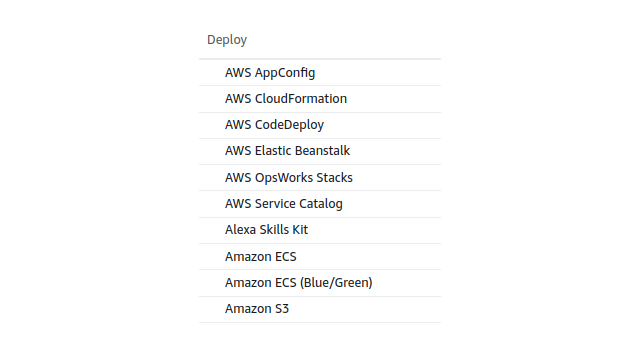
Only after the successful passing of the whole chain of stages, the new code goes on the deploy stage. If one stage fails the whole chain is broken and the product stays of the previous version. Now AWS gives a possibility to deploy on the following resources:
You can secure your sensitive data by adding it to each AWS service separately: AWS CodeBuild, AWS Elastic Beanstalk, etc.
Plus, you can use AWS CodePipeline for CI/CD if the project requires you to make use of the following AWS features: Load balancer, Health checking, Monitoring, Alarms, etc.
Final thoughts
In the end, it gets clear that all these services are alike in their abilities and offer many benefits.
However, you have to mind that your product reliability and the presence or lack of bugs also highly depend on the Unit Tests coverage:
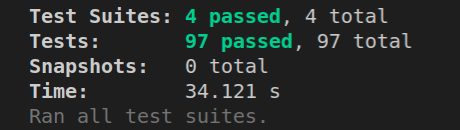
The choice of the service depends on the repository, which corresponds to your needs the most. Thus based on your priorities, you can go for any variant to implement CI/CD into your workflow, even if it is not listed in this article.
CI/CD is a ready-made solution in our company, so we manage to quickly carry out the one that suits you the best. Plus, we can even add this solution to your existing product to prevent bugs in the future.
